

Frequently Asked Questions
Briink is an AI-powered ESG disclosure and sustainability data automation platform. Here is everything you need to understand how it helps you extract, structure, and reuse ESG data at scale.
What Briink Is & How It Works
Briink is an AI-powered ESG disclosure and sustainability data automation platform that helps organizations eliminate manual work in ESG reporting, questionnaires, and sustainability assessments. Briink specializes in extracting, structuring, verifying, and pre-filling ESG information across frameworks such as CDP, CSRD/ESRS, EcoVadis, S&P, GRI, supplier questionnaires, and investor due diligence workflows.
The platform uses AI to analyze sustainability reports, policies, spreadsheets, presentations, and other business documents in order to automatically identify relevant ESG evidence and pre-fill disclosure responses with source-linked references. This helps teams working in sustainability to complete diverse ESG questionnaires faster while improving consistency, traceability, and audit readiness.
Unlike general-purpose AI tools like ChatGPT or Copilot, Briink is purpose-built for ESG workflows. This means it understands framework-specific logic, scoring methodologies, and the types of evidence required to support disclosure responses. In addition to disclosure automation, the platform supports benchmarking, ESG data extraction, collaboration workflows, gap analysis, and centralized knowledge management, allowing organizations to reuse ESG information across frameworks instead of recreating the same answers repeatedly across different reporting requirements.
The platform also offers API capabilities that allow ESG software providers, disclosure platforms, and investor portals to embed AI-powered ESG workflows directly into their products. Briink works with enterprise organizations and sustainability leaders across industries, including Continental, Deutsche Telekom, Bayer, and other global ESG reporting teams.
Briink uses a combination of Natural Language Processing (NLP), Retrieval-Augmented Generation (RAG), and ESG-specific AI logic to process structured and unstructured data sources, including PDFs, Excel files, websites, and data rooms, and automatically extract, structure, and pre-fill ESG assessments, questionnaires, and gap analyses.
You can just upload your existing sustainability reports, policies, and prior disclosures Briink's AI reads and indexes the content. When you open a questionnaire (CDP, EcoVadis, ESRS, etc.), Briink pre-fills answers by pulling the most relevant evidence from your documents, with each answer linked to an exact source, document name, and page number. Teams can then review, edit, and finalize responses.
Briink is built for organizations where ESG data accuracy, speed, and auditability matter. Whether you're a corporate sustainability team navigating annual disclosure cycles, a financial institution managing ESG due diligence across a portfolio, or a platform looking to embed AI-powered ESG workflows into your product, Briink is designed to reduce manual effort and improve the quality of every output.
If ESG data reporting and analysis is a core part of your work, Briink was built for you.
Briink's Questionnaire Assistant is the core product for pre-filling ESG disclosures. The process works in three stages:
- First, you upload your source documents (sustainability reports, policies, prior disclosures, spreadsheets)
- Second, you import or select your questionnaire framework (CDP, EcoVadis, ESRS, custom)
- Third, Briink's AI reads each question, retrieves the most relevant evidence from your uploaded documents, and generates a structured draft answer with a citation linking back to the exact source.
Each pre-filled answer includes the document name, page number, and the specific passage used. Teams can accept, edit, or flag answers for further review.
This approach reduces the time spent on initial questionnaire completion by 40%+ and dramatically improves consistency across reporting cycles, since the same source documents feed all your frameworks rather than teams rewriting the same answers multiple times.
Briink's extraction accuracy significantly outperforms manual review across several dimensions. Because the AI reads the full text of every uploaded document simultaneously, including tables, footnotes, appendices, and embedded data in Excel files, it surfaces evidence that manual reviewers often miss when working under time pressure. Every extracted data point is linked to its exact source (document and page number), making it straightforward to verify.
In practical terms, teams using Briink report 40%+ reductions in time spent on initial questionnaire completion and a 60% improvement in final response quality, as the AI ensures consistency across answers and prevents the gaps and contradictions that arise in manual workflows.
Briink consistently identifies relevant data points that reviewers would take hours to locate manually such as pulling Scope 1, 2, and 3 emissions figures, governance metrics, or social KPI's from reports and policies. Additionally, a lot of the work done by Briink is to prevent hallucinations: if a figure is not present in the uploaded documents, it flags the gap rather than generating a plausible but incorrect number.
Yes. Free trials are customized to meet each organization's specific needs and use case rather than offering a one-size-fits-all demo environment. To access a trial, you can connect with Briink's sales team for a short introductory conversation. This helps us understand your goals (whether that's pre-scoring CDP responses, screening suppliers, or accelerating CSRD compliance) and tailor the trial to your specific documents and frameworks.
To request a trial, you can contact our team here.
Briink offers different plan tiers to suit different organizational sizes and use cases, from small sustainability teams to enterprise organizations with complex multi-framework disclosure requirements and API integration needs. Pricing is not publicly listed as it depends on factors including data volume, number of users, frameworks required, and whether API access is needed.
The best way to understand pricing for your specific use case is to book a demo or use our contact form.
ESG Reporting Disclosures
The platform is framework-agnostic at the data layer, meaning ESG data extracted from your document sources can be mapped into any questionnaire. Additionally, data used for one framework (e.g. ESRS) can be reused and mapped to another (e.g. CDP), preventing teams from recreating the same answers across different disclosure requirements.
Briink supports all major ESG disclosure frameworks and rating systems, including:
- CDP (Climate, Water, Forests)
- CSRD / ESRS
- EcoVadis
- MSCI ESG Ratings
- ISS ESG
- Sustainalytics
- S&P Global CSA
- Investor DDQs
- Custom questionnaires (any framework can be imported in supported file formats)
Briink is CDP's selected AI partner for the 2026 disclosure cycle, which gives the platform deep integration with CDP's platform. Beyond pre-filling CDP questionnaire responses from your existing documents, Briink offers live pre-scoring functionality that shows teams their estimated CDP score before submission, at the question level.
This pre-scoring capability identifies exactly which responses are weak, which evidence is missing, and what changes would most improve the final score. Teams can see gap analysis results mapped directly to CDP's scoring criteria, so they know whether a response is likely to score a "1", "2", or full marks before they submit. This is only possible because Briink has built framework-specific logic that understands CDP's conditional question dependencies, evidence requirements, and scoring thresholds.
For the 2026 disclosure window, Briink also supports seamless submission directly from the platform to CDP, eliminating the final manual upload step.
Yes. As CDP's AI partner for 2026, Briink supports direct integration with CDP's disclosure portal. Teams can prepare and finalize their CDP responses within Briink's platform and push them directly to CDP for submission, eliminating manual copy-paste.
This integration covers CDP Climate, Water, and Forests questionnaires and is available as a ready to use template now inside Briink.
Yes. Briink supports EcoVadis assessment preparation by extracting relevant ESG data from your existing policies, audit reports, certifications, and management system documentation, and mapping that evidence to EcoVadis's four theme areas: Environment, Labor & Human Rights, Ethics, and Sustainable Procurement. The AI identifies which questions your current documentation already addresses and flags areas where evidence is weak or missing before you submit.
EcoVadis assessments are particularly document-heavy, requiring policies, procedures, ISO certifications, KPI data, and training materials, and Briink's ability to process all of these simultaneously and cross-reference them against specific EcoVadis question requirements significantly reduces the preparation time.
CSRD introduces a significantly higher level of granularity, auditability, and mandatory disclosure than previous voluntary frameworks. Briink supports CSRD preparation by helping organizations collect and align ESG data with ESRS requirements, structure qualitative and quantitative disclosures, and identify missing datapoints early, before the formal reporting deadline.
The platform enables teams to coordinate inputs across departments (finance, HR, operations, supply chain) in one shared workspace, with all data linked to verifiable source documents.
Briink also helps organizations reuse CSRD-prepared data across other disclosures (CDP, EcoVadis, investor questionnaires), avoiding the duplication of work that happens when teams treat each framework as a separate project.
Briink automates the most time-consuming parts of ESG reporting workflows, particularly data collection, structuring, and questionnaire completion. The platform analyzes your existing sustainability reports, policies, and prior disclosures to automatically extract relevant ESG evidence and pre-fill disclosure responses with source-linked references, so teams spend less time hunting for data and more time reviewing and refining answers.
Key reporting workflows Briink supports include questionnaire pre-filling across frameworks like CDP, CSRD/ESRS, and EcoVadis, gap analysis against specific framework requirements, live pre-scoring before submission, and cross-framework data reuse, meaning evidence gathered for one disclosure can be mapped and reused across others without starting from scratch.
Briink is not a narrative report generator. It does not produce the final designed sustainability report documents. What it does is eliminate the data collection and structuring work that typically accounts for the majority of time spent in any reporting cycle, leaving teams free to focus on analysis, storytelling, and sign-off rather than manual document review and copy-paste workflows.
Briink helps teams prepare for ESG ratings, including CDP, EcoVadis, S&P Global CSA, MSCI, ISS ESG, and Sustainalytics, by automating the data collection, structuring, and questionnaire workflows that typically consume the most time in a ratings cycle.
The platform extracts relevant ESG data from your existing documents, sustainability reports, policies, certifications, audit reports, and prior submissions, and pre-fills rating questionnaires with structured, source-backed answers. Every response is linked to the exact document and page number it was drawn from, making it straightforward to verify and defend each answer to rating agencies.
Beyond pre-filling, Briink identifies gaps against specific rating requirements, showing teams exactly where evidence is missing or where responses are unlikely to meet the scoring threshold. For CDP specifically, Briink offers a native integration and live pre-scoring functionality that estimates your score at the question and module level before submission, so teams can prioritize improvements where they'll have the most impact on the final rating.
Because Briink stores and indexes your ESG document library centrally, data prepared for one rating (e.g. CDP) can be reused and mapped across others (e.g. EcoVadis, S&P), eliminating the duplication of effort that happens when teams treat each rating as a separate project. This cross-framework reuse is one of the most significant time savings Briink delivers for organizations managing multiple ratings simultaneously.
Platform Features & Capabilities
Yes. Briink includes collaboration features designed for multi-team disclosure workflows. Within the response tool bar team members can be assigned ownership of specific question modules, track completion progress across sections, and add comments directly on individual responses. This is particularly valuable for disclosures that require input from sustainability, finance, operations, legal, and procurement teams simultaneously.
All team members work from the same centralized document base and the same pre-filled draft answers, ensuring consistency and reducing the version control problems that arise when teams work across scattered spreadsheets and email chains. Progress tracking and deadline visibility help teams structure their disclosure cycle proactively rather than reactively under submission pressure.
Briink supports over 85 languages. Users can upload documents in any supported language, write questions in their preferred language, and request responses in a different language if needed. For example, a German-language sustainability report can be uploaded and queried in English.
Language preferences can also be set at the account level via the "user instructions" feature in the ESG Questionnaire Assistant, ensuring consistent output language across a full disclosure workflow without needing to specify it for each question.
Full list of supported languages:
- Albanian, Albania
- Arabic, Arab World
- Armenian, Armenia
- Awadhi, India
- Azerbaijani, Azerbaijan
- Bashkir, Russia
- Basque, Spain
- Belarusian, Belarus
- Bengali, Bangladesh
- Bhojpuri, India
- Bosnian, Bosnia and Herzegovina
- Brazilian Portuguese, Brazil
- Bulgarian, Bulgaria
- Cantonese (Yue), China
- Catalan, Spain
- Chhattisgarhi, India
- Chinese, China
- Croatian, Croatia
- Czech, Czech Republic
- Danish, Denmark
- Dogri, India
- Dutch, Netherlands
- English, United Kingdom
- Estonian, Estonia
- Faroese, Faroe Islands
- Finnish, Finland
- French, France
- Galician, Spain
- Georgian, Georgia
- German, Germany
- Greek, Greece
- Gujarati, India
- Haryanvi, India
- Hindi, India
- Hungarian, Hungary
- Indonesian, Indonesia
- Irish, Ireland
- Italian, Italy
- Japanese, Japan
- Javanese, Indonesia
- Kannada, India
- Kashmiri, India
- Kazakh, Kazakhstan
- Konkani, India
- Korean, South Korea
- Kyrgyz, Kyrgyzstan
- Latvian, Latvia
- Lithuanian, Lithuania
- Macedonian, North Macedonia
- Maithili, India
- Malay, Malaysia
- Maltese, Malta
- Mandarin, China
- Mandarin Chinese, China
- Marathi, India
- Marwari, India
- Min Nan, China
- Moldovan, Moldova
- Mongolian, Mongolia
- Montenegrin, Montenegro
- Nepali, Nepal
- Norwegian, Norway
- Oriya, India
- Pashto, Afghanistan
- Persian (Farsi), Iran
- Polish, Poland
- Portuguese, Portugal
- Punjabi, India
- Rajasthani, India
- Romanian, Romania
- Russian, Russia
- Sanskrit, India
- Santali, India
- Serbian, Serbia
- Sindhi, Pakistan
- Sinhala, Sri Lanka
- Slovak, Slovakia
- Slovene, Slovenia
- Slovenian, Slovenia
- Ukrainian, Ukraine
- Urdu, Pakistan
- Uzbek, Uzbekistan
- Vietnamese, Vietnam
- Welsh, Wales
- Wu, China
Setting a language in the ESG questionnaire assistant with user instructions
Another way to change the language of your outputs is to use the "user instructions" feature in the ESG questionnaire assistant.
This can be especially useful when you have a questionnaire in English, but need to generate answers in another language.
Please note, this feature is currently only available for Briink's ESG Questionnaire Assistant.

You can learn more about how user instructions work in the dedicated article.
The only small clarification here is that currently Briink primarily does its model benchmarking and ensures our model quality with english language data sets so cannot determine with the same level of certainty the quality of responses in other languages. However, based on feedback from our clients and partners, Briink's performance and results remain strong in many other languages.
The ESG Doc Chat is an interactive tool that lets users ask questions directly against their own ESG and sustainability documents, annual reports, human rights policies, environmental data sheets, governance frameworks, and more — in real time. Users upload one or more documents and submit natural language questions; the AI generates answers grounded in the document content and provides source references for each response.
This is particularly useful for quickly locating specific data points (e.g. "What is our Scope 2 emissions figure for 2024?"), verifying whether a policy covers a particular topic, or preparing for rating agency queries. Multiple documents from the same company can be uploaded simultaneously. However, running cross-company assessments within the same Doc Chat session is not recommended, as mixing different organizations' documents may produce inaccurate or conflated results. For multi-company screening, Briink's Batch Screener tool is the appropriate workflow.
🚨 IMPORTANT: Running an assessment on multiple documents that do not pertain to the same company is not recommended, as it might lead to inaccurate and misleading results.

Yes. When an organization’s name is typed into Briink’s screener, a PDF version of the webpage is generated and processed automatically. Briink's Web Scanner can also crawl across multiple pages of a website to find and extract relevant ESG content, for example, pulling sustainability commitments, governance disclosures, or emissions data from a company's corporate responsibility section.
For teams that need to screen many companies at once, such as investor portfolios or supplier bases, the Batch Screenings feature allows multiple companies to be assessed simultaneously using their web presence and any publicly available documents.
Briink applies a "right-sized" approach to AI model selection using lightweight models for simpler classification and extraction tasks, and more advanced models only when the complexity of the task requires it. This minimizes energy consumption per query without sacrificing output quality.
Additionally, rather than training proprietary large models from scratch (which has a significant carbon footprint), Briink builds on existing foundation models enhanced with ESG-specific logic and domain knowledge.
The platform is hosted on low-carbon cloud infrastructure, and all AI systems are governed by a Responsible AI Use Policy.
Briink is powered by a combination of proprietary ESG-trained technology and large foundation models (LLMs), including OpenAI's GPT family. The platform is model-agnostic by design, constantly evaluating new models, including open-source alternatives, to ensure the best performance for specific ESG tasks. Different models may be used for different subtasks: extraction, classification, summarization, and answer verification may each use the most appropriate model for that function.
For questions about model security, data handling, or AI safety, contact business@briink or fill our contact form.
Yes. Briink offers an API that allows ESG software providers, standard bodies, investor portals, and data management systems to embed Briink's AI-powered extraction and pre-filling capabilities directly into their products. This means organizations already using ESG data management platforms can add Briink's intelligence layer without replacing their existing infrastructure.
The API is particularly relevant for platforms or standard bodies that want to offer AI-powered questionnaire automation or document analysis to their own clients without building the underlying AI capability in-house.
Yes. Briink is built to handle a wide range of structured and unstructured data formats, not just PDFs. For evidence upload and AI processing, supported formats include: PDF, Word (.doc/.docx), Excel (.xls/.xlsx/.xlsm), PowerPoint (.ppt/.pptx), CSV, JSON, and XML. For questionnaire import, Briink also supports .txt, .md, and .html formats.
This multi-format capability is important for ESG workflows because sustainability data rarely lives in a single file type. Emissions data is often in Excel, governance policies in Word, assurance reports in PDF, and supplier data in CSV. Briink can process all of these simultaneously and synthesize the evidence across formats when generating questionnaire responses.
Data & File Management
Briink supports a wide range of file formats for both questionnaire import and evidence upload. This flexibility allows teams to work with existing documents and data sources without needing to reformat them.
For questionnaire import:
- .xls
- .csv
- .docx
- .pptx
- .txt
- .md
- .html
For evidence upload (to pre-fill questionnaires):
- .doc, .docx
- .xls, .xlsx, .xlsm
- .ppt, .pptx
- .csv
- .json
- .xml
If there are other file formats that would be helpful for you, we would love to learn more.
There are no limitations in terms of the size of the files you can upload, and you can also upload multiple documents at the same time!
However, if you have already uploaded multiple documents to Briink in the past, and you need to run a new analysis on those same documents, the recommended action is to select documents from your archive.
This will streamline your experience, and help us keep the environmental impact of our software in check! 🌳
If your document upload is taking longer than expected, the first step is to refresh the page, wait a few minutes, and try uploading again. This resolves the majority of slow-loading cases, as the issue is often temporary and related to file size or server processing time rather than a persistent problem.
If the issue continues after retrying, there are a few things worth checking before contacting support. Larger documents, particularly multi-hundred-page sustainability reports or Excel files with complex formatting, may take longer to process than standard PDFs. If you have previously uploaded the same document, selecting it from your file history archive rather than re-uploading it will be significantly faster, as the document is already indexed in the system.
If none of the above resolves the issue, reach out to the Briink support team at support@briink.com or via Intercom directly in the platform. Because slow loading can have several different root causes, file formatting, document complexity, or account-level configuration, the team will investigate and address the issue on a case-by-case basis.
Briink's support team aims to respond as quickly as possible to minimise disruption to your reporting workflow.
To upload multiple documents, select multiple files after clicking the + icon next to ''New Chat'' (in the Doc Chat), “New Assessment” (in the Good Governance Screener), or in the "Select documents" phase of the new Questionnaire Assistant.

When the page to select files comes up, you can use a keyboard shortcut to select more than one file - on an Apple Macbook, you can click on your files while holding Command (or Cmd) ⌘, while on a PC you can click on your files while holding Control (Ctrl), as following:

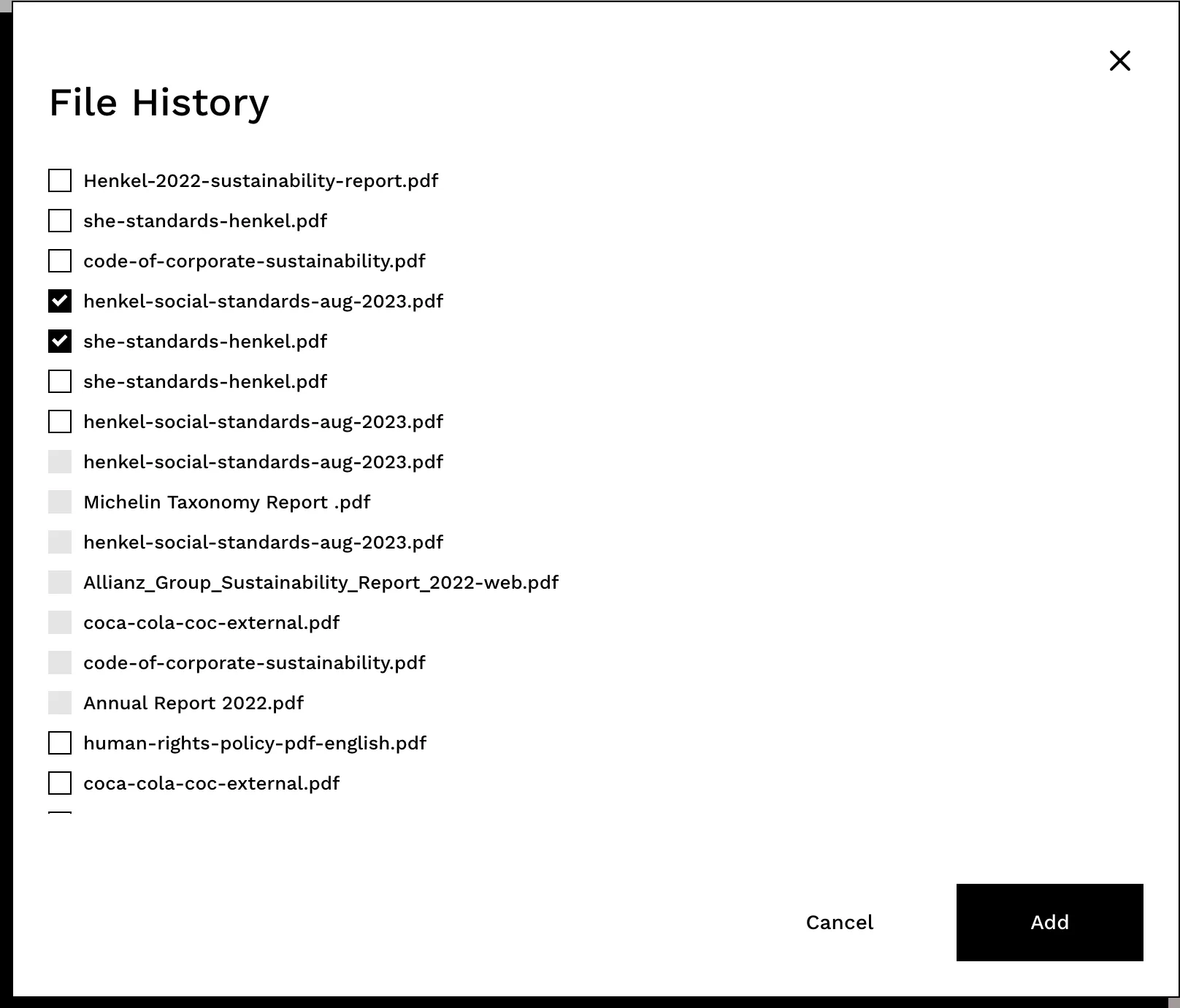
If you wish to select multiple files that you have already uploaded, simply select them from your file history.
Can I upload multiple files after I have already run a chat / an assessment?
It depends on the tool you are using.
Unfortunately, once you have run one assessment in the Good Governance Screener or in Doc Chat, you won’t be able to add more documents to the assessment. If you want to add more documents, you'll need to run that assessment again.
If you do that, we recommend adding the documents you have already uploaded from your file history. This will make the new assessment faster, and it's also better for the environment. 🌳
However, great news - you can add more files even after you have already run the AI tool in our new Questionnaire Assistant!
To do so, simply select Files on the right-hand side of your screen, in the already generated questionnaire view.

A new window will pop up. Select "Add files to screening" by clicking on the big + button to upload new files (or "Add from file history" if these are files you have already uploaded in the past).
Important:
Adding new files to a questionnaire that has already been generated will cause the AI to run again, so you might need to wait a few minutes before being able to see your new answers.

Security & Privacy
The safety of your private data is extremely important to us. If you have an Enterprise plan, by default we will not use the data you upload on Briink to train our models, unless you explicitly allow us to do so.
All client queries and document upload data is encrypted and can only be accessed by designated members of the engineering team for maintenance and assurance purposes.
If you have specific questions about our data security policies, get in touch via our contact form or the email business@briink.com
All data is hosted on Google Cloud Platform (GCP) within European data centers, stored and processed in secure European regions, with backups in separate European regions for availability and resilience.
This European data residency is particularly relevant for organizations subject to GDPR and other EU data protection requirements. This setup ensures data remains within European jurisdictions and benefits from modern, secure, and energy-efficient cloud infrastructure.
Yes. Briink's infrastructure is hosted entirely within the EU on Google Cloud Platform, which supports GDPR compliance requirements around data residency, processing agreements, and data subject rights. Briink is also SOC 2 Type II certified.
For security or compliance inquiries use the contact form or write to us at business@briink.com.
Briink is built with enterprise-grade security and data protection at its core. All customer data is processed and stored exclusively on Google Cloud Platform (GCP) infrastructure located in Europe with encrypted backups maintained in separate European regions for resilience. Customer data remains confidential at all times: we do not share data with third parties, and we do not use customer data to train our AI models by default.
Customers can explicitly opt in or opt out of allowing their data to be used to improve our systems. Additionally, Briink is SOC 2 Type II compliant, demonstrating adherence to rigorous security and operational controls.
Yes. Briink takes the security of customer data seriously and has undergone an independent SOC 2 Type II audit, an external certification that verifies Briink's security controls meet the commitments made to customers. This is the same standard used by leading enterprise software providers and is increasingly required by procurement and legal teams as part of vendor evaluation.
At the infrastructure level, all client data within the Briink production system is protected with full end-to-end encryption in transit and at rest using TLS v1.2 or above. Object-level permissions and logical data separation ensure that data can only be accessed by the correct authenticated user. The production environment is fully segregated from staging and development environments, and all production services operate on a least-access principle, meaning no system or team member has broader access than their role requires.
User identity and access management is handled via secure identity providers with enterprise-grade features including Single Sign-On (SSO), Multi-Factor Authentication (MFA), enforced password policies, and account access monitoring. These controls significantly reduce the risk of unauthorized access even in the event of credential compromise.
On the codebase side, Briink follows a robust software development and code review process with enforced branch policies. Automated vulnerability scans run continuously across the entire codebase and deployed containers, with wider vulnerability assessments conducted regularly and an annual risk assessment covering broader security concerns.
For organizations with specific security requirements, including Data Processing Agreements (DPAs), data residency documentation, or enterprise security reviews, Briink's team can provide detailed documentation.
For security inquiries, contact business@briink.com or contact us here.

Build Once. Reuse
Every Cycle.
Use AI to extract, structure, and reuse ESG data across CDP and beyond. Get ready for AI-powered pre-filling in the 2026 disclosure cycle.